
FORD CARGO H566/H476 Passive Anti-Theft System (Immobilizer)
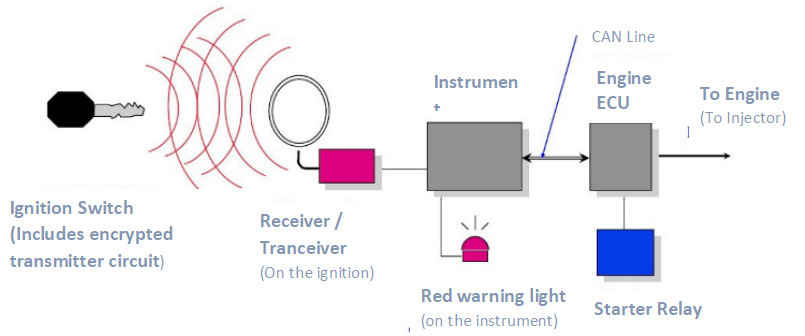
This is a safety system against vehicle theft. Engine does not allow fuel injection and operation of the starter unless it takes the correct code from ignition switch.
Schematic Operating Principle
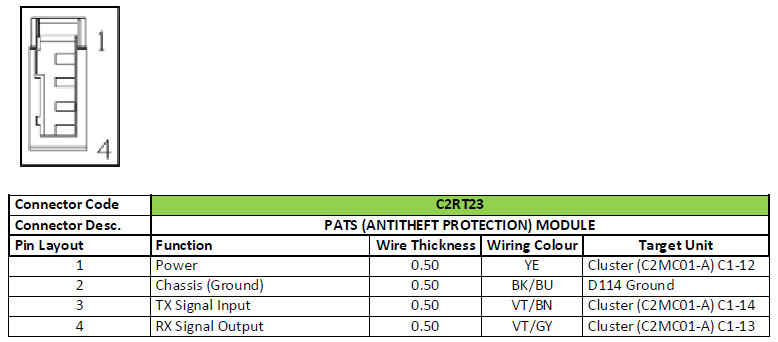
Module Connector and Pin Layout
System Components
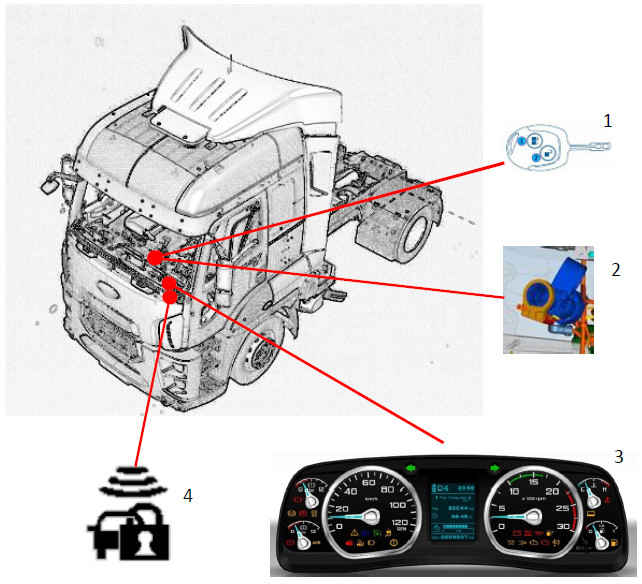
1 - Ignition Switch
2 - Receiver
3 - Instrument
4 - Immobilizer warning lamp
1 - Ignition Switch:
- It includes a circuit encrypted for each vehicle.
- Two keys are programmed in factory for each vehicle.
2 - For:
- It activates the ignition switch with a circular antenna on the
- ignition switch.
- It reads the encrypted code on the key circuit and transfers it to the instrument cluster.
- There is no need to reprogram the new transceiver when it is replaced.
3 - Instrument:
- It checks whether the transceiver code and key code transferred by the transceiver match.
- It communicates with Engine ECU via CAN. It does not allow operation of starter and fuel injection systems if it detects non-matching codes.
4 - Warning Lamp (Red)
It is placed on the instrument cluster. It indicates that the PATS system is activated and also gives an error code if there is a fault in the system.
- When ignition is OFF: It flashes once every 2 seconds to indicate that the PATS system is activated.
- When ignition is in position II:
a) Normal operation: lamp is illuminated for 3 seconds, turns off and does not turn on.
b) Fault in the system: lamp does not turn off after 3 seconds illumination. It flashes continuously.
If ignition is not switched from position II, lamp flashes for 30 seconds and finally it turns off for 3 seconds. Then, it flashes to give an ERROR CODE.
Example: For Error Code 21:
Switch the ignition to position II.
PATS warning lamp flashes for 30 seconds.
Turns off for 3 seconds.
Flashes 2 times: This gives the first digit of error code. In this example: ‘2’
Waits for 2 seconds.
Flashes 1 times: This gives the 2nd digit of error code. In this example: ‘1’
Thus, error code 21 can be read. Same error code is displayed by the system repeatedly.
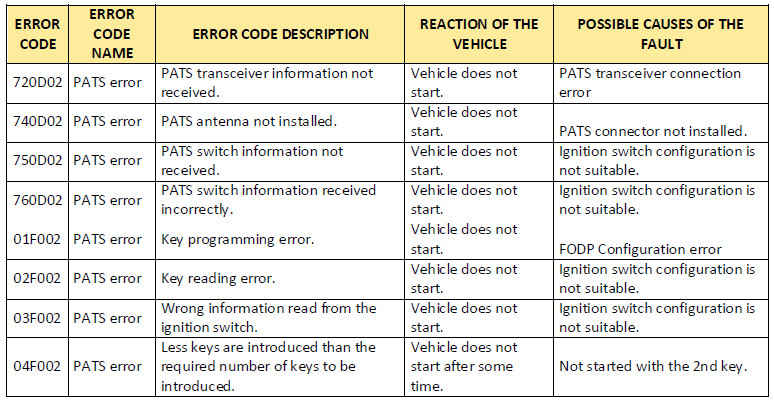
Instrument Cluster Flashing Error Codes:
Things To Do When the Control Module Is Replaced:
On the instrument menu of the FODP-2 software, select the operation required and follow the following procedures:
When the Instrument Cluster is Replaced Only & When Instrument Cluster and Engine Control Unit Are Replaced
Together:
- Bring ignition to position 2.
- Press replacement of cluster.
- Wait for 16 minutes.
- When the operation is completed, both keys are put in the ignition switch and ignition is brought to position 2.
- Operation is completed successfully if the Number of programmed keys: 2 is displaced on FODP2 screen.
When the Engine Control Unit (ECM) is Replaced Only:
- Turn off the ignition.
- Turn off switch.
- Install new ECM to vehicle.
- Turn on the main switch.
- Turn on the ignition.
- Write the vehicle VIN to ECM with FODP-2. (Requires a ticket.)
- Perform Module Programming with FODP-2. (Requires a ticket.)
- Enter injector code. (Requires a ticket)
- Enter CALID code.
- Connect to instrument cluster with FODP-2, select the “ECM replacement only” option from PATS menu.
System starts counting down 16 minutes for safety purposes. When 16 minutes are over, introduce ignition key and spare ignition key by following the instructions on the screen. Operation is completed successfully if the Number of programmed keys: 2 is displaced on FODP2 screen.
Fault 017F may be seen on ECM when a new ECM is programmed. You can just delete it.
Key Deletion:
This is applied when vehicle is lock because of PATS. It shall be applied if PATS lamp does not turn off when ignition
switch is brought to position II and flashes intermittently.
- Bring ignition to position 2.
- Press delete key.
- Wait for 16 minutes.
- When the operation is completed, both keys are put in the ignition switch and ignition is brought to position 2.
- Operation is completed successfully if the Number of programmed keys: 2 is displaced on FODP2 screen.
Introduction of additional keys (3rd Key)
This is applied when the customer asks for a 3rd key.
- Bring ignition to position 2.
- Press Introduce additional (new) key.
- Wait for 16 minutes.
- After completing the operation:
- Install original key. Bring ignition to position 2 and remove the key. Wait for 3 seconds, install original spare key before the 7th second. Bring ignition to position 2. Remove the key, wait for 3 seconds, install original spare key before the 7th second, and bring ignition to position 2. Wait for 3 seconds.
- Operation is completed successfully if the Number of programmed keys: 3 is displaced on FODP2 screen.